I use Handy for my usual day to day needs for voice based transcriptions with post-processing. The transcriptions work flawlessly. But due to the Wayland desktop security restrictions on KDE, it is normally not allowed for applications to enter text, paste text or type text directly into other applications.
That makes a bit of inconvenience for me, as I would prefer Handy to insert the transcription in the active application.
After researching alternative solutions around. I found things like ydotool and kwtype. In the Wayland systems, Handy would need an assistive “typing tool” to simulate the typing into other applications.
After studying it for a bit, I realized kwtype is a much easier and much simpler implementation that can solve this issue.
Why kwtype over ydotool?
- Kwtype is native to KDE, uses the elevated Wayland protocol via kwin implementations.
- It can handle almost all text character types.
- Kwtype does not need an always-on running daemon (service).
- It also does not need to interfere with
udevrules or need/dev/uinputpermissions. - KWin’s simulated input system requires approval only once from the user.
What’s the catch with kwtype?
- kwtype will require a build from the source and GCC libraries to compile.
- Needs more commands in a sequence for the primary setup, once.
Instead of going for a series of console commands, I decided to put them together so this process can be repeated in the future by anyone who wants to fix a similar situation. The script will also allow the end user to run a demo from the console to check if it is working.
I build up the shell script initial version. Of course you are most welcome to improve it.
Get the shell script from my GitHub.
Or simply use this command below.
⚠️ Do not use the sudo with the command below, it will ask for it when it needs it.
curl -fsSL https://raw.githubusercontent.com/ruhanirabin/handy-fedora-kde-wayland-fix/main/install-kwtype-fedora.sh | bashThe process
- Run the script as your desktop user, in the terminal.
- It will prompt you to run as a sudo user when needed.
- This will download and install all the dependencies needed for
kwtypecompilation. - Then it will build the
kwtypefrom the source. - You will be informed when the process is completed.
- You will have a chance and a command which you can use to check the kwtype functionality.
This script is intentionally lightweight.
Once you are done with kwtype integration with Fedora KDE Wayland, you will need to configure some settings in the Handy application.
Handy Configuration
This is only after you are satisfied that kwtype is installed. If Handy is running, exit the application and start it one more time.
In the Advanced tab. Set the preferences as you see in the picture below.
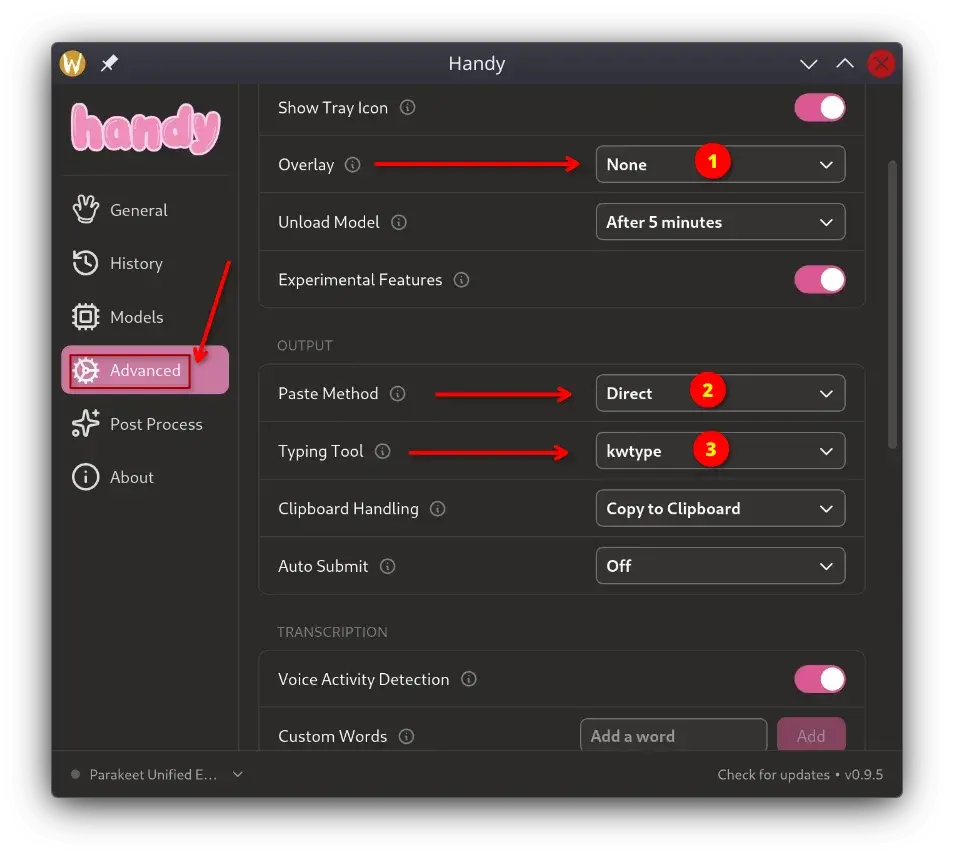
- Set overlay to
none - Set paste method to
direct - Set typing tool to
kwtype
This is it. Now when you call Handy for your voice transcriptions, it will automatically enter the transcription in your active text editing box. It can be a browser window text box, Kate, VSCode or any other similar text editing applications.
NOTE: This process might not be able to enter the text into the console.