I spent a bit too long staring at a Fedora GRUB theme that looked correct and still refused to show up. Classic. Previously, I did this for Linux Mint, but that was slightly easier, even with UEFI and Secure Boot.
The theme files were there, the config looked fine, and I had already done the usual bit of downloading the Fedora theme from the preview page and copying it into place. The thing I missed was annoyingly small.
What I had already done
I grabbed the Fedora theme from:
https://k1ng.dev/distro-grub-themes/preview
Then I copied the fedora folder to:
/boot/grub2/themes/fedora/After that I edited:
sudo nano /etc/default/gruband added:
GRUB_THEME="/boot/grub2/themes/fedora/theme.txt"Then I rebuilt the GRUB config:
sudo grub2-mkconfig -o /boot/grub2/grub.cfgNone of that was the real problem.
The bit that was missing
I had left GRUB in console mode.
That was the whole thing.
The line I missed was:
GRUB_TERMINAL_OUTPUT="gfxterm"That was the critical part. I had the theme path right, but GRUB was still acting like a plain text console, so the graphical theme never had a chance to render.
The actual fix was to switch it so GRUB could use graphical terminal output instead.
The fix
In /etc/default/grub, make sure the relevant bits look like this:
GRUB_TERMINAL_OUTPUT="gfxterm"
GRUB_THEME="/boot/grub2/themes/fedora/theme.txt"
Then rebuild the config again:
sudo grub2-mkconfig -o /boot/grub2/grub.cfgAfter that, reboot.
What happened after that
It worked.
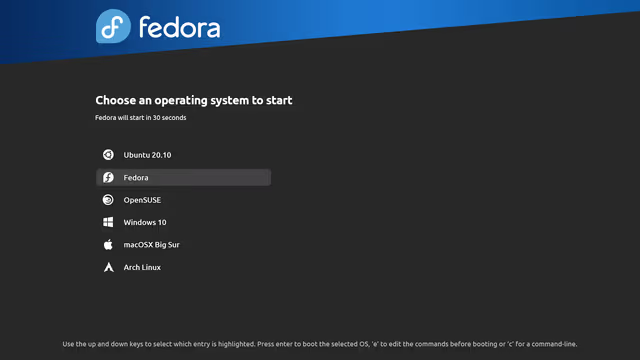
Here is the sample output, i could not take a proper screenshot as it is a boot menu. So the above is from the preview wiki.
The theme came up, the fonts worked, and the whole GRUB → gfxterm → theme path finally behaved like it was supposed to.
The wallpaper looked a little stretched on my ultrawide display, which is fine. That was expected enough to not bother me.
The fonts were also a bit smaller than I really wanted. Probably two or three points bigger would be nicer. But for now it is readable, so I left it alone instead of turning a working setup into another round of fiddling.
Here is the code for my current GRUB2 config file.
GRUB_TIMEOUT=5
GRUB_DISTRIBUTOR="$(sed 's, release .*$,,g' /etc/system-release)"
GRUB_DEFAULT=saved
GRUB_DISABLE_SUBMENU=true
GRUB_TERMINAL_OUTPUT="gfxterm"
GRUB_GFXMODE="auto"
GRUB_GFXPAYLOAD_LINUX="keep"
GRUB_CMDLINE_LINUX="rhgb quiet rd.driver.blacklist=nouveau,nova_core modprobe.blacklist=nouveau,nova_core"
GRUB_DISABLE_RECOVERY="true"
GRUB_ENABLE_BLSCFG=true
GRUB_THEME="/boot/grub2/themes/fedora/theme.txt"
Quick version
If the GRUB theme keeps falling back to plain text on Fedora KDE Plasma, check this first:
GRUB_TERMINAL_OUTPUT="gfxterm"I had the theme path right. I had rebuilt GRUB. I had the files in place.
The missing terminal line was the actual blocker.
Very annoying. Also very fixable.